
Most advertisers check their Quality Score once, see a number they don't fully understand, and move on. Then they wonder why their cost per click keeps climbing while a competitor seems to show up everywhere for less.
I've been auditing Google Ads accounts since 2013. Quality Score problems show up in almost every single one. Not because it's complicated, but because most businesses either ignore it entirely or chase the number in ways that don't actually help.
Fix it properly and you can pay significantly less per click than the advertiser sitting right next to you in the auction. Ignore it and you'll keep funding Google's bottom line more than you need to. This guide covers exactly what Quality Score is, why it matters, and what to actually do about it.
Key Takeaways
- Quality Score is a 1-10 diagnostic tool that directly affects how much you pay per click. A score above 5 gets you a discount. Below 5, you pay a premium.
- The three components are Expected Click-Through Rate, Ad Relevance, and Landing Page Experience. Each is graded: Above Average, Average, or Below Average.
- A low Quality Score doesn't just cost you money on individual clicks. It restricts how often your ads show and where they appear in the auction.
- Fixing Quality Score is not about gaming Google. It's about aligning your keywords, ad copy, and landing pages so tightly that the user gets exactly what they searched for.
- Dynamic Keyword Insertion, proper campaign structure, and landing page speed are the highest-leverage improvements most businesses overlook.
- Tools like Optymyzr, Adalysis, and Opteo make it far easier to monitor and act on Quality Score at scale, so you're not manually digging through columns in Google Ads.
What is Quality Score, Really?
Google makes money two ways. First, by giving users the most relevant search results possible so they keep coming back. Second, by showing ads that people actually click on so Google earns revenue from those clicks.
Quality Score exists because of both. It's Google's way of telling advertisers: your ads either serve the user well, or they don't. If they do, Google rewards you. If they don't, you pay more and show up less.
Every keyword in your account is assigned a Quality Score from 1 to 10 once it reaches a threshold of impressions and clicks. A score of 7 or above is where you want to be. Below 5 is a problem worth fixing immediately.
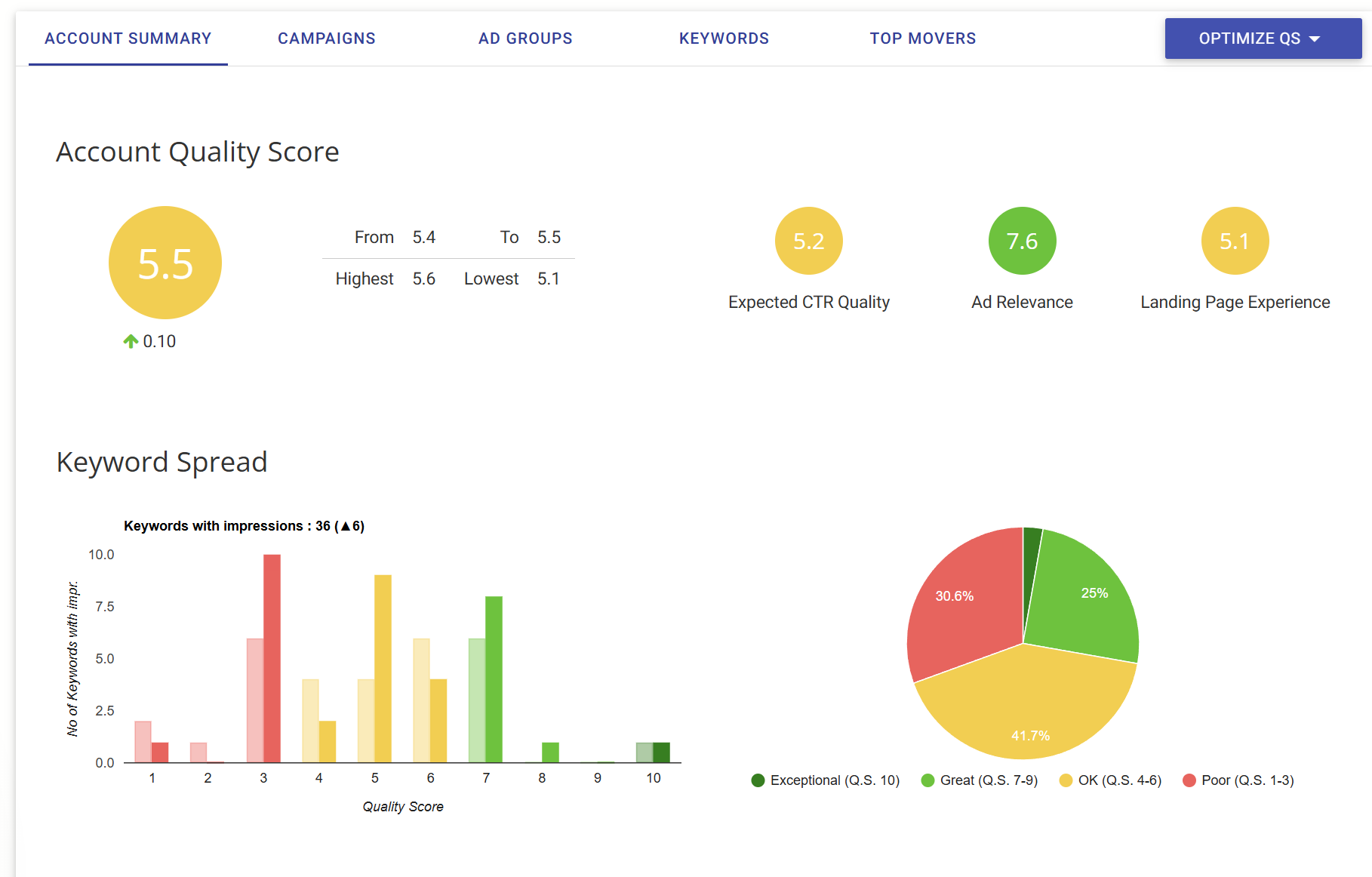
An account averaging 5.5 across all three components. The Keyword Spread shows most keywords sitting in the 3-7 range, meaning there's significant room for improvement across the board.
Key Takeaway
A Quality Score of 7+ is the benchmark. Below 5 means you're paying a penalty on every click. Most accounts we audit sit in the 4-6 range, which means there's almost always room to reduce costs significantly.
The Three Grades You Need to Understand
Google doesn't give you a detailed breakdown of exactly how your score is calculated. What it does give you is a grade on each of the three components that feed into it:
- Expected Click-Through Rate (CTR) - how likely Google thinks people are to click your ad when it appears for that keyword.
- Ad Relevance - how closely your ad copy matches the intent behind the search query.
- Landing Page Experience - how useful and relevant your landing page is to the people who click through.
Each is graded Above Average, Average, or Below Average. The moment you see a Below Average on any of them, that's where you start.
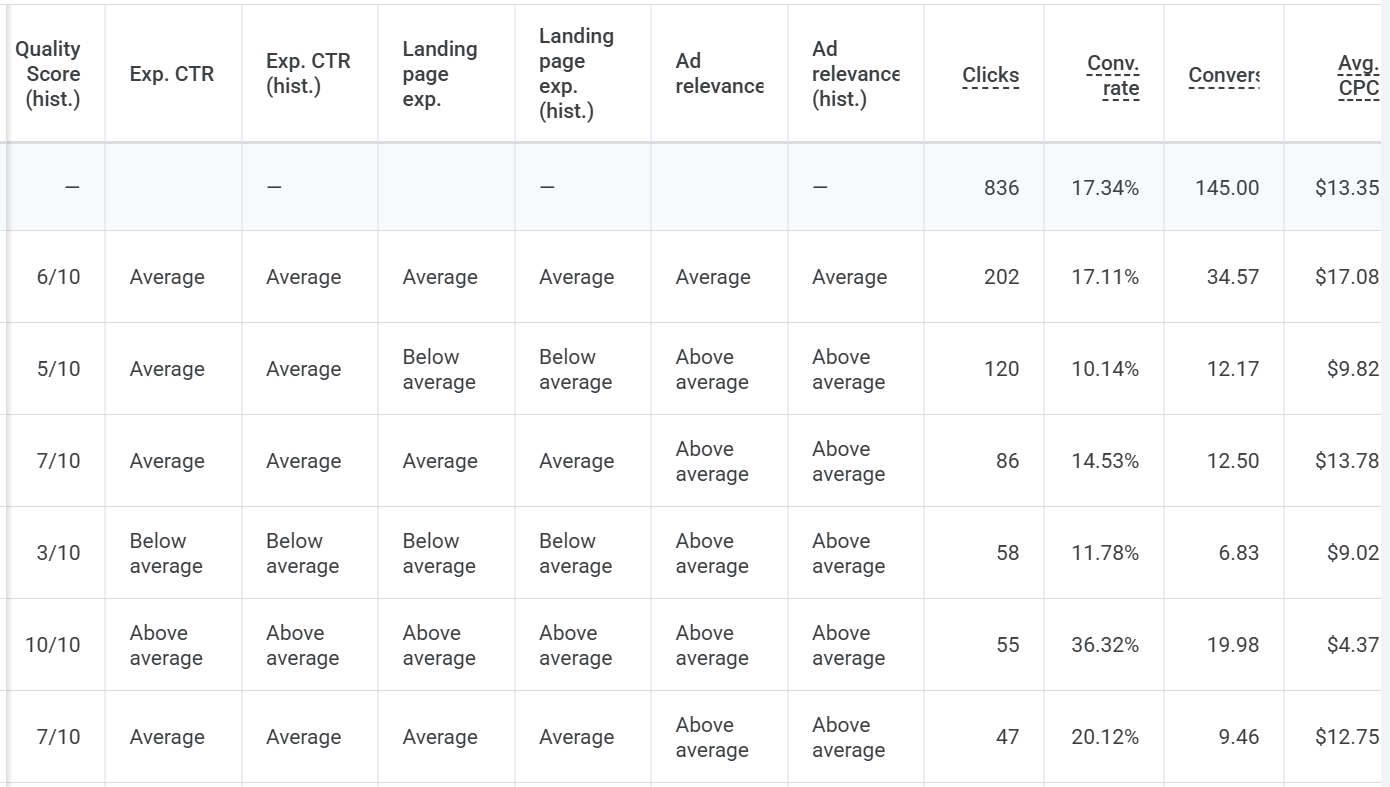
A real keyword-level breakdown showing how each component maps to actual performance. Notice how the keyword with a 10/10 Quality Score has a 36.32% conversion rate and the lowest CPC at $4.37, while the keyword with a 3/10 score converts at only 11.78%.
Why Quality Score Matters More Than Most People Realise
The obvious benefit is cost. A higher Quality Score means a lower cost per click. Google literally charges you less per click when your ads are more relevant. That means for the same budget, you get more clicks, more leads, and more conversions.
But there's a second effect that doesn't get talked about enough. Quality Score also influences your Ad Rank, which determines where your ad appears on the page. You can outrank a competitor who is bidding more than you, purely by having a better Quality Score.
Think about what that means in a competitive market. Your competitor is paying more per click, appearing lower on the page, and getting fewer conversions. Meanwhile, you're paying less, showing up higher, and capturing the leads they're missing. That compounding advantage is significant.
Expert Tip
Quality Score is a multiplier, not just a metric. A 2-point improvement in Quality Score doesn't just save you a few cents. It can reduce your effective CPC by 20-30%, which on a $5,000/month budget means an extra $1,000-$1,500 worth of clicks every month without spending a cent more.
The Real Cost of Ignoring It
When your Quality Score is low, you're paying a penalty on every single click. Accounts that have been running with poor structure and weak relevance for months or years are often paying 30 to 50 percent more per click than they need to. I've seen it be even worse than that in badly neglected accounts.
On a $5,000 per month budget, that could mean you're wasting $1,500 to $2,500 every month on inflated click costs. That's not a rounding error. It's the difference between a campaign that works and one that quietly bleeds money while everyone assumes the market is just expensive.
How to Improve Your Expected Click-Through Rate
Expected CTR is Google's prediction of how likely your ad is to get clicked. It's based on your historical performance for that keyword, the quality of your ad copy relative to competitors, and how relevant your ad appears for the query. If this component is Average or Below Average, the work starts with your ad copy and your account structure.
Write Ad Copy That Filters, Not Just Attracts
The goal of your ad is not to get the most clicks. It's to get the right clicks. This sounds obvious but most of the ad copy I see in audits does the opposite. It's vague enough to appeal to everyone, which means it compels nobody.
An ad that uses specific, benefit-driven language will have a higher CTR among the right audience, which is exactly what Google is looking for. If you're targeting someone searching for a personal injury lawyer, a headline that says 'No Win, No Fee Personal Injury Claims' is far more likely to get clicked by a genuine claimant than 'Law Firm - Contact Us Today'. Specificity does two things: it attracts the right people and repels the wrong ones. Both outcomes improve your CTR quality.
Some things worth testing in your copy:
- Use the specific search term or a close variation in your headline. If someone searches 'slip and fall lawyer Brisbane', your headline should reference that. It also gets bolded in the search results.
- Lead with a clear outcome, not a service description. 'Get Compensation for Your Injury' outperforms 'Personal Injury Legal Services'.
- Use numbers and specifics where possible. '97% Success Rate' or 'Settled Over 2,400 Cases' builds immediate credibility.
- Make your call to action describe what happens next. 'Get Your Free Case Assessment' is clearer than 'Contact Us'.
Pro Tip
Test your ad copy against the specific search terms triggering your ads, not just your target keywords. Pull your Search Terms Report and read the actual queries people are typing. If your ad headline doesn't feel like a natural answer to those queries, your Expected CTR will suffer.
Use Ad Assets (Extensions) Aggressively
Google's ad assets, formerly called extensions, take up more real estate on the page and give users more reasons to click. They're free to add and they consistently improve CTR when used well.
The most impactful ones to start with:
- Sitelink assets - link directly to specific pages like your contact page, pricing, FAQs, or testimonials. They make your ad larger and give users shortcuts to exactly what they want.
- Callout assets - short snippets that highlight key benefits like 'No Win No Fee', 'Free Consultation', or 'Available 24/7'. Keep them direct and outcome-focused.
- Call assets - add a click-to-call button on mobile. For service businesses, this is one of the highest-converting actions a user can take.
- Location assets - if you have a physical location, this adds credibility and helps with local intent searches. If you haven't already, make sure your Google Business Profile is fully optimised to get the most out of this.
- Structured snippet assets - highlight specific services, case types, or areas of expertise in a scannable format.
Don't overthink which assets to use. Add all the ones relevant to your business and let Google optimise which combination shows. The more you give it to work with, the better.
Build and Maintain Your Negative Keyword List
One of the fastest ways to drag down your Expected CTR is to have your ads appearing for irrelevant searches. Every time your ad shows for a query it shouldn't, and nobody clicks, Google interprets that as your ad being less relevant. That pushes your Expected CTR down.
Having audited hundreds of Google Ads accounts over the years, the pattern is consistent: most accounts are wasting a substantial portion of their budget on search terms that will never convert. Not a small amount. I've seen accounts where the majority of spend was going to queries that had no realistic chance of producing a lead. The wasted spend eats into budget and drags down Quality Score at the same time, so you're paying for the privilege of making your account worse.

A real search terms report from an account audit. Terms like "singing", "lessons", and "near" are consuming clicks and budget with zero conversions. This is money being set on fire while simultaneously dragging down the account's Quality Score.
Building a strong negative keyword list is one of the highest-leverage things you can do, and most people treat it as a one-time setup task rather than ongoing account hygiene.
Here's how to approach it properly:
- Start by reviewing your all-time search term report. Filter by low CTR, high spend, and zero conversions. These are your obvious negatives.
- Use Google's search predictions and related searches to find categories of terms to exclude. Brand names of products you don't carry, competitor names if you're not running competitor campaigns, and intent modifiers like 'free', 'DIY', or 'how to' are common ones.
- Run an N-gram analysis to find single words that are draining budget across your entire account. Tools like Optymyzr and Adalysis have N-gram functionality built in.
Instead of blocking 'free personal injury advice Brisbane', you might just block the word 'free' and clean up dozens of variations at once. Negative keywords aren't a one-time job. Review your search term report every week, especially in new campaigns, and keep building the list as new irrelevant terms emerge.
Quick Win
Export your all-time Search Terms Report right now. Sort by cost descending, then filter for zero conversions. You'll almost certainly find hundreds or thousands of dollars in wasted spend on terms that should have been negated months ago. Add them as negatives today.
Use Responsive Search Ads Properly
Responsive Search Ads (RSAs) let you provide up to 15 headlines and 4 descriptions. Google then tests different combinations to find what performs best for different queries and users. Most people set up RSAs and assume the work is done. It's one of the common Google Ads mistakes we see repeatedly. The reality is that what you put in determines what you get out.
- Write 15 genuinely different headlines. Don't repeat the same idea with slightly different wording. Cover your main keyword, your key benefits, social proof, your CTA, and objection handling.
- Don't rely too heavily on pinning. Pinning forces a headline into a specific position, which limits Google's ability to test and optimise. Use it sparingly, only for your most critical messaging.
- Check the Ad Strength indicator. 'Excellent' is the goal. If it says 'Poor' or 'Average', Google is telling you the headlines aren't diverse or relevant enough.
- Review the Combination Report in Google Ads to see which headline and description combinations are appearing most. This gives you real data on what Google finds most relevant, which can then inform your approach in other areas.
How to Improve Ad Relevance
Ad Relevance measures how closely your ad copy matches the intent behind the search. If someone searches for 'no win no fee personal injury lawyer' and your ad headline says 'Expert Legal Services', you have an ad relevance problem. The fix is tighter campaign structure combined with a concept I call the perfect match.
Keyword Clustering: Why SKAGs Are Done
Single Keyword Ad Groups (SKAGs) used to be the standard recommendation for maximising ad relevance. One keyword per ad group, one tightly written ad, one dedicated landing page. Total control over what triggered your ad and what the user saw. Google killed that with close variants. An exact match keyword today is not exact match in the way it used to be. Target 'personal injury lawyer' and Google will also show your ad for 'injury claim solicitor', 'accident compensation lawyer', 'personal injury attorney', and a range of semantically related queries it deems equivalent. You have no way to opt out of this.
The practical result is that SKAGs create a false sense of control. You think you have one keyword per group, but you're actually triggering dozens of variations you didn't choose and can't isolate. When multiple SKAG ad groups share overlapping close variants, they compete with each other, reporting becomes murky, and the relevance you were trying to achieve gets diluted anyway. We don't recommend this structure anymore.
Keyword clustering is the current best practice. Instead of a single keyword per group, you build groups around a shared intent or theme. All the variations that mean the same thing live in the same group, with ad copy written to speak to that theme, and traffic sent to a relevant landing page. We cover this in depth in our guide on how to structure PPC campaigns that convert.
In practice this might look like a location-based campaign where each ad group covers one suburb. Inside that ad group you have all the relevant variations: 'personal injury lawyer Parramatta', 'injury claim Parramatta', 'no win no fee lawyer Parramatta', 'compensation lawyer Parramatta'. They share intent, they match the same ad, and they land on the same page. That's tight enough to be relevant without the fragmentation of SKAGs.
Key Insight
SKAGs died because Google's close variant matching made them redundant. Keyword clustering around shared intent is the modern replacement. Group keywords by what the searcher actually wants, not by exact phrasing, and write ad copy that speaks to that intent.
The Perfect Match Framework
Perfect match is the principle that the search term, the ad headline, and the landing page headline should all be saying the same thing in the same language.
When someone searches 'no win no fee car accident lawyer Sydney' and your ad headline says 'No Win No Fee Car Accident Lawyers in Sydney' and they land on a page that opens with the same headline, Google recognises that continuity. So does the user. Bounce rates drop, time on page increases, and both of those signals feed back into your Quality Score.
The challenge is scaling this. If you're targeting hundreds of keyword variations across multiple locations, you can't manually build a perfect landing page for every single one. That's where dynamic keyword insertion comes in, which we'll cover in the landing page section.
How to Improve Landing Page Experience
Landing Page Experience is often the most overlooked of the three Quality Score components, and it requires the most work to fix. It's also the one with the biggest upside because a better landing page improves your Quality Score and your conversion rate simultaneously. Fix it once, and everything gets better.
The most common situation I see: an advertiser has done a reasonable job on their ad copy and campaign structure, but they're sending traffic to a generic website page that wasn't built for paid traffic. Google knows. The bounce-back rate tells the story. Google assesses your landing page on relevance, usefulness, transparency, and technical performance. Here's how to tackle each one.
Get the Technical Basics Right First
Before anything else, check your page speed using PageSpeed Insights (pagespeed.web.dev). It's free, takes 30 seconds, and will tell you more about why your landing page experience score is suffering than most paid tools. A page that takes more than three seconds to load on mobile is losing you Quality Score points and conversions at the same time. The most common culprits are large uncompressed images, excessive third-party scripts, and hosting on a slow shared server. I've seen beautifully designed landing pages that converted terribly because they took eight seconds to load on mobile. The design was irrelevant because most visitors were gone before they saw it.
Mobile optimisation is non-negotiable. For most industries, the majority of clicks come from mobile devices. A page that looks fine on desktop but breaks on mobile will tank your landing page experience score and your conversion rate simultaneously. Check both. Fix both. If you're unsure how much a proper website should cost, we break that down separately.
Bounce Rate vs. Bounce-Back Rate: An Important Distinction
Most people know that bounce rate is bad for landing pages. What fewer people understand is that Google isn't primarily looking at your bounce rate when assessing landing page experience. It's looking at something slightly different: the bounce-back rate.
A bounce rate, as measured in Google Analytics, counts any session where the user only visited one page, regardless of how long they spent there. Someone could read your landing page for four minutes, decide to call you directly, and still be counted as a bounce.
A bounce-back is when someone clicks your ad, lands on your page, and then immediately reloads the Google search results. They went back to look for something else. That's the signal Google actually cares about, because it indicates the page didn't give them what they were looking for.
These two things are strongly correlated but not the same. If your bounce rate is high but your landing page experience is graded Above Average, the issue may be in how your analytics is configured rather than the quality of your page. Conversely, a high bounce-back rate almost always points to a relevance problem: the user expected one thing and found another.
Key Insight
Google cares more about bounce-back rate (users returning to search results) than bounce rate (single-page sessions). A user who reads your page for 4 minutes and calls you is technically a "bounce" but not a bounce-back. Focus on reducing the users who click back to Google within seconds. That's the signal that tanks your Landing Page Experience score.
Fixing High Bounce-Back Rates
The fix for a high bounce-back rate is usually the same as the general landing page work outlined above: tighter message match between the ad and the page, faster load speed, and content that directly addresses what the user was searching for. Many of the principles from our 7 lessons from optimising 400+ landing pages apply directly here. But it's worth understanding the distinction because it changes how you diagnose the problem. Most visitors aren't ready to convert on the first visit, so keeping them engaged long enough to build trust is critical.
Match the Page to the Ad, Every Time
The single most common landing page experience problem is a mismatch between what the ad promised and what the page delivers. Someone clicks on an ad for 'slip and fall injury claims' and lands on a generic 'personal injury services' page with fifteen different practice areas listed. Google spots the disconnect. So does the visitor, and they're gone within seconds.
I've seen this kill otherwise well-structured campaigns. The keyword targeting is right, the ad copy is solid, but the traffic lands somewhere too broad and the leads never materialise. It's a fixable problem, but it requires accepting that your main website probably wasn't designed for paid traffic and acting accordingly. We cover exactly how to optimise landing pages for PPC traffic in a separate guide.
Every ad group should ideally send traffic to a page that mirrors the specific intent of that ad group. For smaller accounts, this is achievable with dedicated landing pages. For accounts targeting dozens of locations or hundreds of variations, you need a smarter approach.
Dynamic Keyword Insertion on Landing Pages
Dynamic Keyword Insertion (DKI) on landing pages lets you automatically swap out key elements like headings, subheadings, and body text based on the search term or parameters passed through the URL. Instead of building 200 landing pages, you build one template and let the system personalise it at scale.
The principle is straightforward. Your ad passes a parameter in the URL, for example the suburb or the service type, and your landing page reads that parameter and inserts it into pre-defined locations on the page. The headline becomes 'No Win No Fee Personal Injury Lawyers in Parramatta' for a Parramatta visitor and 'No Win No Fee Personal Injury Lawyers in Penrith' for a Penrith visitor, all from a single page.
Several platforms support this natively or with minimal configuration:
- GoHighLevel (GHL) - has built-in dynamic content functionality that can read URL parameters and populate them across the page without needing a developer.
- Unbounce and Instapage - both have robust DKI features specifically designed for paid search campaigns and are widely used for this exact use case.
- WordPress with custom development or plugins - entirely buildable if you have a developer. The logic is not complex: read a URL parameter, output it into a text field. Lovable AI can build this into a custom landing page rapidly if you have the brief ready.
- Webflow and other modern builders - with a developer or some custom code, you can read URL parameters via JavaScript and inject them into any text element on the page.
The key is to pass the right parameters from your Google Ads URLs using ValueTrack parameters like {keyword} or custom UTM parameters for location. Your landing page then reads those values and updates the content accordingly.
When done well, DKI on landing pages creates a seamless experience where the user sees exactly what they searched for, from the ad all the way through to the page. That continuity is exactly what Google is looking for.
Pro Tip
Don't just use DKI for headlines. Apply it to subheadings, CTA button text, and even testimonial sections (e.g., showing location-specific reviews). The more personalised the entire page feels, the lower your bounce-back rate and the higher your Landing Page Experience score.
Testing Fast: Why Your Landing Page Setup Determines Your Speed Limit
Understanding what needs to improve on a landing page is one thing. Being able to actually test it quickly is another. Most businesses get stuck here because their website is a static setup that requires a developer, a ticket, and a two-week wait to change a headline.
If that's your situation, you'll never close the loop between data and improvement. You'll know your landing page experience score is below average and you won't be able to do anything about it fast enough to matter.
This is where AI-driven landing page tools like Lovable have changed the game. You can brief in a new above-the-fold layout, a different headline angle, or a complete page restructure and have a testable version live within hours rather than weeks. The ability to move fast is what separates accounts that compound their improvements from accounts that plateau.
The types of tests worth running regularly on your landing pages:
- Form position - form above the fold versus below the fold changes conversion rates significantly depending on the traffic temperature and the complexity of what you're asking people to commit to.
- Headline variations - does leading with the outcome ('Get Your Compensation Faster') outperform leading with the credential ('Award-Winning Personal Injury Lawyers')? You won't know until you test.
- Testimonial placement - social proof above the fold versus below the fold. For high-intent searches where trust is the barrier, moving testimonials up often has a bigger impact than changing the headline. Your Google review profile feeds directly into this too.
- Page length - for some audiences a short, direct page converts better. For others, more detail and more trust signals wins. Test both before assuming.
- CTA copy and colour - 'Get a Free Assessment' versus 'See If You Have a Case' are functionally similar but psychologically different. Small copy changes can move conversion rates meaningfully.
None of this testing is possible at a useful speed if you're dependent on a developer every time you want to make a change. Platforms like Lovable let you build and iterate on landing pages without that bottleneck. GoHighLevel, Unbounce, and Instapage all have built-in split testing you can run without touching any code.
The bottom line: if your current website setup makes it hard to change landing pages quickly, that's not a minor inconvenience. It's a structural disadvantage that directly limits how fast you can improve your Quality Score and your conversion rate. Solving the infrastructure problem is often the first step, not the last one.
What a Strong Landing Page Needs
Relevance and page speed are the technical side. The content and structure of the page matters just as much for user experience. Keep landing pages simple. A lot of businesses make the mistake of sending paid traffic to their full website, where visitors have too many choices and no clear path. A dedicated high-performance lead generation website with one goal converts at a higher rate and signals a better user experience to Google.
- A headline that matches or closely mirrors the ad copy and search term. This is the first thing the user reads and the main signal to Google that you've got message match right.
- A subheadline that reinforces the main value proposition. One or two sentences that expand on what makes you the right choice.
- Social proof above the fold where possible. Reviews, case outcomes, awards, or recognisable client logos. This reduces bounce rates immediately.
- A clear, singular call to action. Not three options. One. Whether it's a form, a phone number, or a booking button, make it obvious and repeated throughout the page.
- Enough content to answer the main questions a visitor would have. Not a novel, but enough substance that someone with genuine intent can make a decision.
Tools That Make Quality Score Management Easier
Managing Quality Score manually inside Google Ads works at small scale. Once your account grows across multiple campaigns, ad groups, and keywords, you need tools that surface the data faster and flag what needs attention.
Here are three worth knowing about:
Optymyzr
Optymyzr is a Google Ads management platform built around automation and optimization workflows. Its Quality Score tools let you monitor QS trends over time at the account, campaign, and ad group level, which is something Google's native interface makes surprisingly difficult.
It also has N-gram analysis built in, which is one of the most effective ways to identify negative keyword opportunities across large accounts. You can run an N-gram report, see which individual words are appearing in high-cost, low-conversion search terms, and build out negatives systematically rather than guessing.
Adalysis
Adalysis is strong on ad testing and Quality Score tracking. It tracks QS changes over time for every keyword, which lets you see whether the optimisations you're making are actually improving scores or not. Without that historical view, it's hard to know if what you're doing is working.
It also has an ad testing framework that automatically identifies underperforming ads and recommends which to pause and which to keep, which directly feeds into improving Expected CTR.
Opteo
Opteo takes a more suggestion-driven approach. It monitors your account continuously and surfaces recommendations prioritised by their likely impact. Quality Score improvements, negative keyword additions, and landing page issues all surface as actionable cards you can approve or dismiss.
For smaller teams that don't have time to run regular deep-dive audits, Opteo keeps account health on the radar without requiring constant manual review. If you're considering outsourcing this work, we've outlined the key questions to ask before hiring a PPC agency. It's not a replacement for strategic management, but it's a useful early warning system.
Any of these tools are worth the investment if you're managing an account with meaningful spend. The time saved on manual analysis more than covers the cost, and you make better decisions when the data is surfaced clearly rather than buried in columns.
How to Monitor Quality Score and Track Progress
Quality Score isn't static. It changes as your historical performance builds, as competitors adjust their accounts, and as you make changes to your ads and landing pages. You need to track it over time to know whether what you're doing is working.
Inside Google Ads, the columns you want to add to your keywords view are:
- Quality Score - the current score from 1 to 10.
- Exp. CTR - the Expected Click-Through Rate component grade.
- Ad Relevance - the Ad Relevance component grade.
- Landing Page Exper. - the Landing Page Experience component grade.
- Historical Quality Score - shows what the score was in previous periods so you can spot trends.
Look at these columns sorted by impression volume. The keywords that are generating the most impressions and have low Quality Scores are the ones to prioritise. A keyword with 10 monthly impressions and a QS of 4 is not worth losing sleep over. A keyword with 5,000 monthly impressions and a QS of 4 is costing you money every single day. Set a schedule to review Quality Scores monthly at minimum. Major changes to ads or landing pages can move scores within weeks, so monthly check-ins tell you quickly whether your changes are landing.

Impressions by Quality Score distribution. You want the bulk of your impressions concentrated at 7 and above. In this account, scores 4-6 are dominating the impressions, which means the majority of ad spend is being taxed with a below-optimal CPC.
Common Quality Score Mistakes That Are Easy to Fix
After working across hundreds of Google Ads accounts, certain mistakes come up again and again. Most of them are structural, not strategic, which means they're fixable without a complete campaign overhaul. Some of these will be obvious once you see them listed. The frustrating part is how often they're obvious in hindsight but invisible while they're happening.
- Sending all traffic to the homepage. Homepages aren't designed to convert a specific type of visitor. Every campaign should have a landing page that matches the intent of the ads in that campaign. This one mistake alone can make an otherwise solid account underperform significantly.
- Having too many keywords in a single ad group. If your ad group contains 80 different keywords covering different topics, your ad copy can't be relevant to all of them. Tighten your groups and write more specific ads. The ad relevance grade will tell you when this is the problem.
- Never updating ad copy. Google rewards diversity and freshness in RSAs. If your ads have been untouched for six months, some of your headlines have likely stopped performing and the combinations Google favours have probably shifted.
- Ignoring the search term report. This is where accounts quietly bleed money. Review it weekly, especially in new campaigns. The search term report shows you exactly what people typed before clicking, and there are almost always irrelevant queries in there that you're paying for and getting nothing from.
- Not tracking conversions properly. If Google doesn't know which clicks led to conversions, it can't optimise for them and you can't make informed decisions about what's working. Incomplete conversion tracking is surprisingly common, even in accounts that have been running for years. We wrote about why most lead generation ads fail and tracking is almost always part of the problem.
Fast Fix
Add the Quality Score columns to your keyword view today. Sort by impressions (highest first) and filter for Quality Score below 6. The keywords at the top of that list are your biggest opportunities. Fix the worst offender first and check back in 30 days.
The Quality Score Trap: When Obsessing Over It Becomes Counterproductive
Having said everything above, there's a version of Quality Score obsession that does more harm than good. It's worth being direct about this because some of the advice circulating online takes QS optimisation to extremes that aren't justified by how the auction actually works.
The Reported Number is a Diagnostic, Not the Auction Input
Google has been explicit about this: the Quality Score you see in your account is a diagnostic tool. It's a historical snapshot based on past performance. The actual auction uses real-time signals that are similar in concept but not identical to the number displayed in your keywords column.
This matters because advertisers who chase the displayed number as if it's a live performance metric are chasing a proxy. The underlying factors (ad relevance, landing page experience, and expected CTR) are what actually influence auction outcomes. Those are worth improving. The number itself is just a readout of how you're tracking on those factors.
In Competitive Niches, Quality Score is a Muted Advantage
Quality Score is graded relative to other advertisers competing for the same keyword. In a niche where everyone targeting 'personal injury lawyer Sydney' has decades of historical data, strong landing pages, and well-structured accounts, the QS range across the field might be 5 to 7 for almost everyone. The competitive difference collapses.
In those environments, the primary auction differentiator shifts back toward bid. Understanding how much Google Ads actually costs in your market helps set realistic expectations. Marginal improvements from a 6 to a 7 will lower your CPC slightly but won't transform your results. Contrast that with a lower-competition niche where a well-structured account genuinely stands out against advertisers who've never touched their QS, and the gains are much more pronounced. The small budget problem makes this even more pronounced.
This doesn't mean you ignore Quality Score in competitive markets. It means you maintain realistic expectations about how much it moves the needle relative to the work involved, and you don't let QS optimisation crowd out other higher-leverage work like conversion rate optimisation or bid strategy.
Don't Delete Campaigns Because of a Low Quality Score
This one needs to be said plainly. There are advertisers who pause or delete ad groups and campaigns purely because the Quality Score is low. This is almost always the wrong call.
The only question that matters is whether a campaign is generating profitable conversions. A QS 5 campaign that consistently delivers high-value leads is worth more than a QS 9 campaign generating nothing. QS is a tool for diagnosing why something might not be performing, not a verdict on whether it should exist.
If a low QS campaign is also generating poor leads at high cost, that's a performance problem worth fixing or cutting. But the QS is a symptom, not the cause. Fix the relevance and landing page issues and the number follows. Don't reverse-engineer from the number.
Older Accounts With Damaged History Are a Genuine Challenge
Expected CTR has a historical component. Google's assessment of how likely your ad is to get clicked is partly informed by your account's track record on that keyword over time. If an account has years of poor structure, irrelevant clicks, and weak ad copy baked into its history, improving the structure today doesn't immediately wipe that out.
This is a real limitation that doesn't get talked about enough. In older, heavily mismanaged accounts, some keywords carry a reputational penalty that takes a long time to shift regardless of how much you improve the setup. In those cases, sometimes rebuilding under a fresh campaign with a clean structure is faster than trying to rehabilitate a keyword with years of poor history dragging it down.
The practical takeaway: treat Quality Score as a compass, not a scoreboard. It points you toward problems worth fixing. When fixing those problems leads to better ads, more relevant landing pages, and lower bounce-back rates, your costs drop and your results improve. That's the outcome worth chasing. The number on the dashboard is just a by-product of getting those things right.

The same type of account dashboard after systematic Quality Score optimisation. Overall score moved from 5.5 to 8.7, with Ad Relevance hitting a perfect 10 and Landing Page Experience at 9.5. That's a fundamentally different cost structure for every click. We've applied this same CRO methodology to Google Ads accounts with similar results.
The Bottom Line
Quality Score isn't a vanity metric. It's a direct multiplier on every dollar you spend in Google Ads. A well-structured account with strong Quality Scores gets more impressions, pays less per click, and generates more leads for the same budget. I've seen this play out enough times across enough accounts that it's not a theory. It's just what happens when you get the fundamentals right.
The work is not glamorous. Keyword clustering, tighter ad groups, better copy, faster landing pages, ongoing negative keyword management. But it's the kind of work that compounds. Every improvement reduces your cost per click going forward, which means every lead you generate from that point costs less.
Start by adding the Quality Score columns to your keywords view and finding the highest-traffic keywords with scores below 6. Pick the worst offender and work through the framework above: improve the ad relevance, tighten the landing page, build out your negatives. Check back in 30 days. That's how you do it. Not by chasing the number, but by fixing the things the number is pointing at.
Want us to look at your Quality Score and tell you exactly what's holding your account back? Book a free Google Ads audit and we'll walk you through it.
Want us to implement these strategies for you?
Book a free strategy call and let's discuss how we can grow your business.
Book Your Free Call
Written by
Byron Trzeciak
Founder of PixelRush, Byron has spent over a decade mastering digital marketing. His agency has helped 300+ brands grow, managed $10M+ in ad spend, and optimised 400+ landing pages. He shares hard-won strategies so you can skip the learning curve.
Continue Reading
View All →
Why Personal Injury Google Ads Are Getting More Expensive (And What to Do About It)
22 min read
The Lead Response Crisis: Why Your "Bad Leads" Might Actually Be Gold
4 min read